
AOSU camera
Independent site whose links lead to the official AOSU products.
BATTERY CAMERA
WIRED CAMERAS
INDOOR CAMERAS
SOLAR CAMERAS
VIDEO DOORBELLS
By Thomas Rivière, Product Analyst — Last updated: 30 September 2026
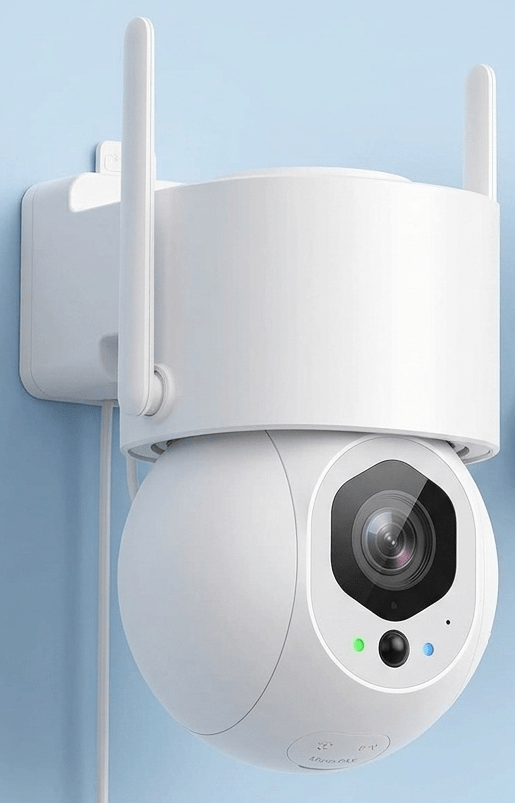
Discover the AOSU indoor cameras, designed to effectively monitor your living rooms, children’s bedrooms, pets or home offices. Equipped with smart features like automatic motion tracking and crisp night vision, these cameras provide complete, connected surveillance.
Available Models: IndoorCam P1 Pro and IndoorCam P1
Both models — IndoorCam P1 Pro and IndoorCam P1 — share many advanced features, with some differences in resolution and capabilities to suit your home security needs.
Overview of AOSU Indoor Cameras
- 360° panoramic surveillance
- Smart tracking of people and pets
- Clear night vision with infrared LEDs
- Two-way audio with one-click calling
- Dual-band Wi-Fi: 2.4 GHz and 5 GHz for a stable connection
- Privacy mode to cover the lens
- Local or cloud storage according to your preferences
IndoorCam P1 Pro: advanced indoor surveillance
The IndoorCam P1 Pro is a premium AOSU indoor camera with a resolution of up to 4 MP QHD, delivering more detailed footage to easily identify faces, toys or important objects in the room. Its 360° coverage allows you to monitor every angle with no blind spots.
It also includes features such as one-click calls to communicate with family members, smart motion tracking and compatibility with voice assistants like Alexa and Google Assistant.
IndoorCam P1: balanced and versatile performance
The IndoorCam P1 also offers 360° surveillance, 2K QHD video quality, automatic motion tracking and effective night vision. Accessible and reliable, it is the ideal solution for monitoring your home, children or pets without compromising on quality.
Common Smart Features
All AOSU indoor cameras are equipped with smart functions for effective surveillance:
- Automatic motion tracking: the camera automatically pans and tilts to follow movement in its field of view.
- Infrared night vision: clear visibility even in complete darkness.
- Instant calls: real-time communication with a single tap.
- Two-way audio: built-in microphone and speaker for remote conversation.
- Dual-band Wi-Fi: robust 2.4 GHz or 5 GHz connection.
- Privacy mode: the lens can be physically covered via the app when you are home.
Installation and Storage
AOSU cameras are quick and easy to install via the dedicated mobile app. They connect to your home Wi-Fi network for continuous monitoring. You can choose between local storage via SD card (not included) or secure cloud storage according to your preferences and budget.
Why choose an AOSU indoor camera?
AOSU indoor cameras are designed to provide smart, smooth and effective surveillance, whether to:
- Monitor living rooms or children’s bedrooms
- Keep an eye on pets
- Easily communicate with family members remotely
- Integrate security into your smart home with Alexa or Google
Key Takeaways
- 2 models: IndoorCam P1 (2K) and P1 Pro (5MP/3K) — both with 360° PTZ.
- Auto-tracking: the camera pans to follow detected people.
- Privacy mode: physically disable the lens from the app.
- Dual-band Wi-Fi 2.4 GHz and 5 GHz — stable connection in large rooms.
- No mandatory subscription — local recording on microSD.
FAQ – AOSU Indoor Cameras
What is the difference between IndoorCam P1 Pro and IndoorCam P1?
The main difference is resolution: the P1 Pro offers 5MP (3K) quality for exceptional detail, while the standard P1 provides very capable 2K resolution. Both models share the same smart tracking features.
Do AOSU cameras work with Alexa or Google Assistant?
Yes, AOSU indoor cameras are fully compatible. You can stream the live video feed to your connected displays — such as an Echo Show or Google Nest Hub — with a simple voice command.
Can I record without a subscription?
Absolutely. Local recording on a microSD card is available at no monthly cost. Cloud storage is an additional option for those who want off-site backup, but it is not required.
How do I view recorded footage?
All your videos are instantly accessible via the AOSU mobile app. You can browse your SD card history or view your cloud-stored alerts from anywhere.
AOSU Indoor Camera Detailed Product Sheets
Explore All AOSU Camera Guides
- Solar Cameras Guide
- Wired Cameras Guide
- Battery Cameras Guide
- Video Doorbell Guide
- Wired Cameras Comparison
Featured Products
Choosing the right indoor camera for your home
Indoor security cameras serve several distinct purposes in a residential setting. As a baby monitor, the AOSU IndoorCam P1 Pro with colour night vision allows parents to check on a sleeping child in complete darkness without disturbing them. As a pet camera, the auto-tracking PTZ function keeps a dog or cat in frame as it moves around the room, with the built-in speaker enabling you to interact with your pet remotely during the working day. For property protection during absences, any AOSU indoor camera positioned at the main entrance area provides deterrence, evidence capture and remote monitoring capability.
When selecting an indoor camera, the primary consideration is whether you need auto-tracking (PTZ) or a fixed-lens camera. PTZ cameras — both the IndoorCam P1 and P1 Pro — can follow movement across a room from a single position, making them more versatile for general-purpose monitoring. Fixed cameras cover a defined field of view and are more appropriate when you always need to monitor a specific zone such as a doorway, a cot in a corner or a specific section of a room where the subject does not move significantly.
Privacy considerations for indoor cameras
Installing indoor cameras in your own home is legal in the UK and EU within the spaces you own or rent, provided you do not monitor shared areas such as communal corridors or neighbouring properties. If other adults share your home, informing them of the camera presence and purpose is both recommended practice and a legal requirement under GDPR in many European jurisdictions when the footage could identify individuals other than yourself.
AOSU addresses privacy concerns with several built-in features. Privacy Mode disables the camera stream automatically when you are at home, triggered by geofencing or a manual schedule in the app. All footage stored locally on the microSD card is AES-128 encrypted. If cloud storage is enabled, it uses EU-based servers compliant with GDPR data protection regulations. The P1 Pro additional local facial recognition feature stores all biometric data exclusively on the camera hardware — no facial data is ever transmitted to AOSU or third-party servers.
Frequently Asked Questions
Can I use an AOSU indoor camera as a baby monitor?
Yes. The AOSU IndoorCam P1 and P1 Pro are both suitable as baby monitors. Key features for this use case include colour night vision that avoids the red glow of infrared LEDs, two-way audio so you can soothe your child remotely, and auto-tracking that keeps a mobile infant in frame as they move in the cot. The P1 Pro adds cry detection that sends a priority alert when it recognises a baby crying, distinguishing the sound from general background noise or TV audio in adjacent rooms.
Does the AOSU indoor camera work without internet?
Yes. The camera records to a local microSD card regardless of internet connectivity. Detection and recording continue normally during WiFi or internet outages. You will not receive push notifications or be able to access live view remotely during outages, but all events are captured locally and available for review once connectivity is restored. Cloud sync resumes automatically when the internet connection returns, uploading any queued clips to the AOSU cloud if that service is enabled on your account.
What is the maximum microSD card size for the indoor cameras?
The AOSU IndoorCam P1 and P1 Pro both support microSD cards up to 256 GB (exFAT format, SDXC class). A 128 GB card is the sweet spot for most users, providing approximately 10 to 14 days of event-triggered recording or 4 to 7 days of continuous recording at 1080p and 2K resolution respectively. Recording operates in loop mode — the oldest footage is automatically overwritten when the card reaches capacity, ensuring the camera always has space for new recordings without manual management.
Between the IndoorCam P1 and P1 Pro, the real difference is the Pro’s on-device facial recognition and colour night vision usable with as little as a 0.5 W nightlight — features worth the premium specifically for nursery or bedroom monitoring where a standard infrared glow would disturb sleep.